AI client intake for law firms, in English, Spanish, Farsi and Armenian

Every caller heard. Every matter on your desk by morning.

When someone calls your firm at 9 p.m. after the worst day of their year, Your Legal Brain answers. It listens the way your best intake specialist would, asks the right questions for their case, flags what can’t wait, and leaves a clean intake for your attorneys to review in the morning.

It always says it’s an AI. It never gives legal advice. An attorney reviews every matter, and your firm can be live in about ten minutes.

A woman sitting in her car at night, on the phone, with freeway lights behind her
9:04 p.m., just rear-ended on the 405
New intake, Tuesday
Caller
Maria D., spoke Spanish
Practice area
Personal injury, rideshare collision
What happened
Rear-ended on the 405. ER visit, neck pain. Police report.
Flags
Insurer wants a recorded statement
Call back
Tomorrow after 4 p.m., in Spanish

In one paragraph

Your Legal Brain is an AI voice intake assistant for law firms. A potential client presses one button on the firm’s website and talks. The assistant tells them it’s an AI, gathers the facts, asks the follow-up questions that fit the practice area, flags urgent matters and possible deadlines, and delivers a structured intake with the full transcript to the firm’s inbox and email within about a minute, for an attorney to review. It speaks English, Spanish, Farsi and Armenian and works 24 hours a day.

Most people with a legal problem reach out once. Whoever answers first usually gets the case.

After hours

Trouble keeps its own schedule

Accidents, arrests and eviction notices don’t wait for business hours. A caller who reaches voicemail at 9 p.m. is often talking to another firm by 9:15.

In their language

People hire who they understand

In cities like Los Angeles, many callers are more comfortable in Spanish, Farsi or Armenian. If they can’t explain the problem, they don’t sign.

Without the details

A message isn’t an intake

“Please call me back” isn’t an intake. Attorneys lose time chasing basics before they can even run a conflict check.

One matter, from a late-night call to your morning coffee

Nothing to download for your clients and nothing to learn for your staff. Here’s what happens to a single call.

  1. The caller presses one button

    A “Talk to our intake team” button sits on every page of your website, or they open your private intake link from a text or email. They pick a language and start talking.

  2. The assistant listens and qualifies

    It recognizes the type of case and asks the three to five questions an experienced intake specialist would ask for it, with the right tone for an accident, an arrest or a custody dispute. After an accident, it asks if they’re safe before it asks for facts.

  3. It flags what can’t wait

    Someone in custody, a court date next week, papers served, an eviction notice, an old incident that may be near a deadline: all marked urgent for an attorney.

  4. Your team gets the intake

    A summary, contact details, the names for your conflict check and the full transcript land in your inbox and email within about a minute.

  5. An attorney calls back, prepared

    No phone tag to collect basics. Your attorney already knows what happened, what’s urgent and when to call, in the caller’s language.

An attorney at her desk in the morning, reading an intake from a manila folder beside a green banker’s lamp
8:00 a.m.She already knows what to ask, and that it’s urgent.

Live demo

Talk to it yourself

Play a caller: a car accident, a relative who was arrested, an eviction notice. Try it in Spanish or Farsi. This is the same assistant your clients would hear, with your firm’s name on it.

One-minute walkthroughA caller talks, the assistant qualifies the matter, and the intake lands in your inbox. Watch with transcript
  • Uses your microphone; nothing is recorded until you press start.
  • Try asking it whether you have a case. It will politely decline.
  • Law firm? Tell it so, and it will answer your questions about the product.

What callers hear, and what your attorneys receive

Three sample calls, entered as exhibits. The names are invented; the questions, tone and safeguards are exactly how the assistant behaves.

AssistantHi, thank you for contacting Rivera & Stone. I’m the firm’s AI intake assistant. I’m not an attorney and I can’t give legal advice, but I can take down what happened so an attorney can review it. What’s going on?
CallerI got rear-ended on the freeway two days ago and my back is killing me.
AssistantI’m so sorry. Before anything else, are you safe, and have you been able to see a doctor?
CallerI went to urgent care. The other driver’s insurance keeps calling me.
AssistantThank you for telling me. I’m flagging the insurance calls so an attorney looks at this quickly. Was a police report made at the scene?
CallerDo you think I have a case?
AssistantThat’s exactly the right question for an attorney, and I’m noting it as a priority. My job is to make sure they have everything they need to answer it.
Intake: personal injuryExample
Caller
James T., (555) 010-2231
What happened
Rear-ended on I-10 two days ago. Back pain; seen at urgent care. Police report made.
Conflict check
Other driver: Dana Mills. Insurer: named by caller
Flags
Insurer calling caller
Hopes for
Help with medical bills and missed work
Checks
✓ AI disclosed✓ No legal advice

It knows what to ask for every kind of case

The assistant understands every major branch of law well enough to recognize the issue and ask the right follow-up questions. It uses that knowledge to ask better questions, never to give answers.

Personal injury

Car, truck, rideshare, slip-and-fall, dog bites, malpractice, wrongful death.

Asks: injuries and treatment, police report, insurers, time off work.

Criminal defense

DUI, drug, theft, assault, domestic violence, warrants, record clearing.

Asks: charges, custody, booking number, bail, next court date. Never the conduct.

Family law

Divorce, custody, support, restraining orders, adoption, guardianship.

Asks: whether it’s safe to talk, children’s ages, existing orders.

Immigration

Family petitions, visas, asylum, removal defense, detention and bond.

Asks: notices and hearing dates. Never presses on status.

Employment

Wrongful termination, harassment, discrimination, unpaid wages, retaliation.

Asks: employer, dates, internal and agency complaints.

Landlord–tenant & real estate

Evictions, habitability, deposits, foreclosure, title and HOA disputes.

Asks: notice type and the date it was served.

Estate & probate

Wills, trusts, probate, contests, conservatorship, elder financial abuse.

Asks: planning ahead or a death, existing documents, disputes.

Business & contracts

Breach of contract, partnership disputes, collections, IP, leases.

Asks: parties, written agreement, amount at stake, deadlines.

And more

Bankruptcy, consumer, civil rights, benefits appeals, insurance disputes, tax.

Plus: your firm’s own instructions, in plain English.

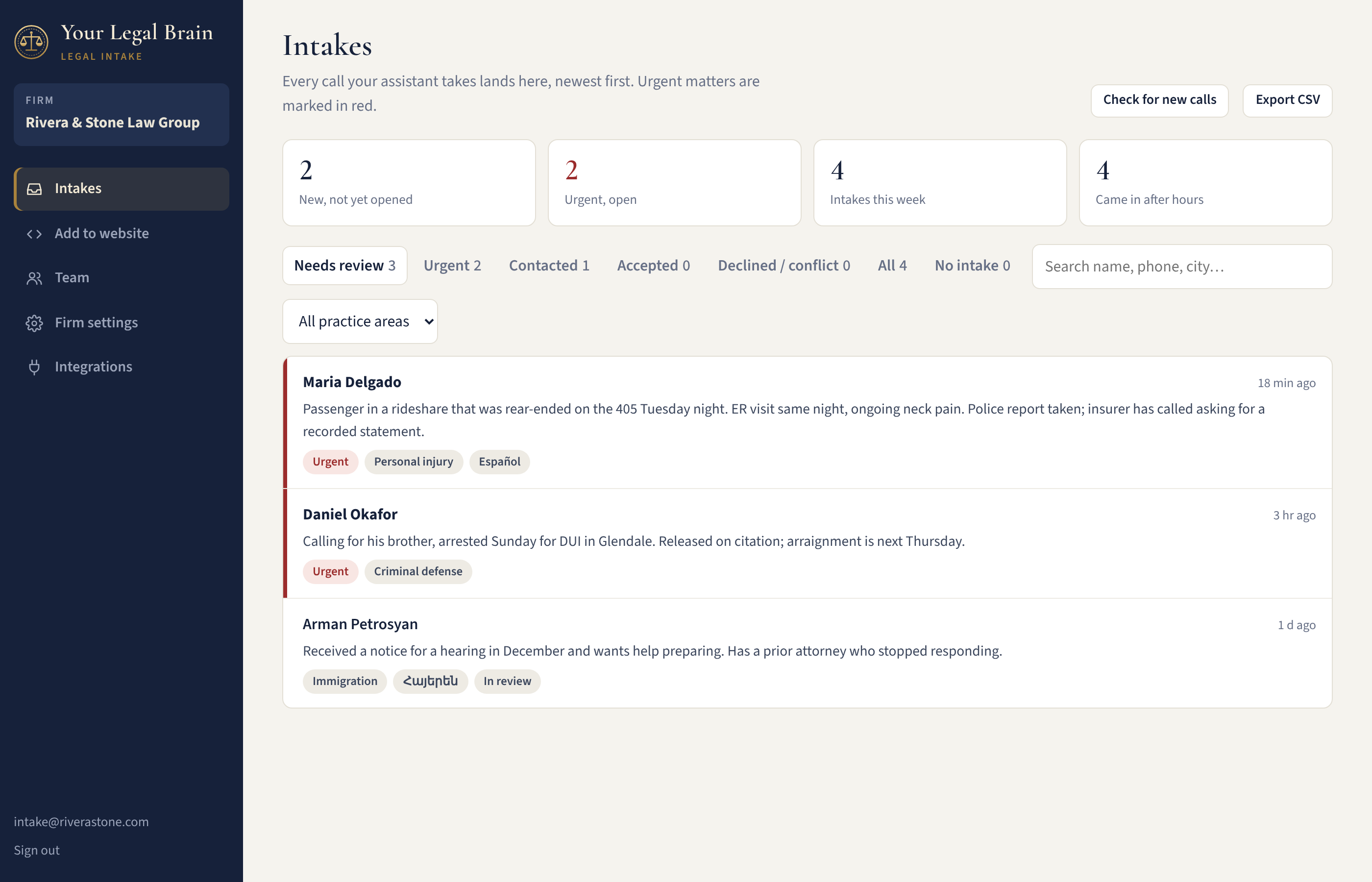
An intake inbox your staff will actually like

  • Urgent matters first. Red flags for custody, court dates and served papers; a separate warning when an attorney should check filing deadlines.
  • Everything for the callback. Tap to copy phone and email, the caller’s preferred language and best time to call.
  • Conflict check ready. Opposing parties listed on every intake.
  • Simple workflow. Mark contacted, accepted, declined or conflict; leave notes for the team; export to a spreadsheet.
  • Into your case system. One click copies the intake for Clio, MyCase, Filevine or anything else. Direct connections are on the way.
The Your Legal Brain intake inbox showing new and urgent intakes with practice areas, languages and summaries

The rules of every call

Built for the rules lawyers work under, with state bar guidance on AI in mind, including California’s SB 37. Each firm should confirm its use with its own bar’s rules; we’re glad to help.

Always discloses it’s an AI

At the start of every call, and again whenever a caller seems unsure who they’re talking to.

Never gives legal advice

No opinions on the case, no values, no predictions, and never a deadline stated as fact.

Promises nothing

Explains that the call doesn’t create an attorney-client relationship and the firm hasn’t agreed to representation.

Protects the caller

In criminal matters it won’t take an account of what happened. Emergencies go to 911 and crises to the 988 Lifeline.

Collects only the basics

Asks callers not to share Social Security numbers, account numbers or documents.

Private to your firm

Each firm’s intakes are walled off at the database level. Your assistant only runs through your code, and you can lock it to your own website.

Live on your website in about ten minutes

  1. Create your firm. Name, practice areas, languages and office hours.
  2. Choose who gets intakes. Any number of email addresses.
  3. Paste one line of code. In your website footer. Or skip the website and share your private intake link.
<script src="https://www.yourlegalbrain.com/embed.js" data-firm="your-firm" async></script>
WordPressWixSquarespaceWebflowShopifyAny website

Who built Your Legal Brain

Siamak Kalhor, founder of Your Legal Brain
“Most firms don’t lose cases on the law. They lose them in the first five minutes, to a voicemail. I built Your Legal Brain so the first five minutes are the best part of working with you.”
Siamak Kalhor, founder. Los Angeles AI strategist and fractional CMO with forty years in marketing across legal, medical, e-commerce, hospitality and finance. About Siamak · AI for law firms

What attorneys ask us

Something else? Ask Siamak directly, or ask the live demo.

What is Your Legal Brain?

An AI voice intake assistant for law firms. It answers potential clients on your website around the clock, asks the qualifying questions an experienced intake specialist would ask, flags urgent matters, and sends a structured intake with the full transcript to your attorneys for review.

Does the AI give legal advice?

No. It tells every caller it’s an AI and not an attorney, never comments on the strength or value of a case, never states deadlines, and never promises representation. It explains that the call doesn’t create an attorney-client relationship. Every intake is reviewed by an attorney before anyone acts on it.

Which languages does it speak?

English, Spanish, Farsi and Armenian. Callers pick a language before they start, and the assistant switches if they change mid-conversation. Intakes reach your team in English.

Which practice areas does it handle?

Personal injury, criminal defense, family, immigration, employment, landlord–tenant, real estate, estate and probate, bankruptcy, business and contract disputes, civil rights and benefits appeals. It adapts its questions and tone to each, and you can add your firm’s own instructions in plain English.

How does it handle accidents, arrests and other sensitive calls?

It leads with care. After an accident it asks whether the caller is safe and getting medical care before collecting facts. In criminal matters it doesn’t ask what the person did and stops callers who start describing their own conduct, focusing on charges, custody and court dates. Emergencies go to 911 and crisis callers to the 988 Lifeline.

How do intakes reach us?

Each finished call appears in your private intake inbox within about a minute and is emailed to the people you choose. Every intake includes contact details, practice area, location, dates, opposing parties for your conflict check, urgency flags, a summary and the full transcript. One click copies it into Clio, MyCase, Filevine or any other system.

Is client information kept private?

Yes. Each firm’s intakes are isolated at the database level so no other firm can see them. Your assistant can only be started through your firm’s code, and you can restrict it to your own website. Callers are asked not to share Social Security numbers, account numbers or documents.

Is AI intake allowed under bar rules?

AI intake that gathers facts without giving legal advice generally fits within existing professional rules when callers know they’re speaking with an AI, confidentiality is protected and an attorney supervises. Your Legal Brain was designed around those principles and California’s SB 37. Please confirm your own use with your state bar’s guidance.

How long does setup take, and what does it cost?

Setup takes about ten minutes: create your firm, choose who receives intakes, paste one line of code. Pricing depends on your call volume and whether you want us to set it up for you. Ask for a quote.

Who built it?

Siamak Kalhor, a Los Angeles AI strategist and fractional CMO with forty years of marketing experience across legal, medical, e-commerce and finance, built Your Legal Brain through Siamak Kalhor Consulting.

By morning, it’s on your desk

Tonight’s callers are deciding which firm to hire.

Give them someone to talk to.